Table of Contents
What BOM-Level Quoting Actually Means
Why BOM-Level Quoting Breaks Down as Line Count Grows
The Four Places Manual BOM Quoting Actually Fails
Getting a Clean Comparison Isn’t the Same as Getting a Fair Price
A Worked Example: Should-Cost Benchmarking Across a Multi-Line BOM
What to Look for in BOM-Level Quoting Software
How Cost It Right Handles BOM-Level Quoting End to End
FAQs
A costing engineer at a sheet metal fabricator gets a 380-line BOM for a new enclosure assembly on a Monday morning. By Thursday, she’s split it into eleven supplier-specific packages, chased two suppliers who quoted against the wrong drawing revision, and is still reconciling one supplier’s per-kilogram pricing against another’s per-piece quote in a spreadsheet that now has fourteen tabs. The RFQ hasn’t gone anywhere near an approval workflow yet. This is what BOM-level quoting actually looks like at the line-item count most manufacturers deal with, and it’s a different problem than sourcing five or ten parts by hand.
What BOM-Level Quoting Actually Means
BOM-level quoting is the process of taking a full bill of materials, every part, sub-assembly, and raw material needed to build a product, and turning it into priced, comparable supplier quotes across every line at once, rather than sourcing one part at a time.
A BOM for a moderately complex assembly can run anywhere from fifty to several hundred line items, split across suppliers who each cover only a fraction of the list: fasteners go to one supplier, machined components to another, electrical parts to a third. BOM-level quoting is the discipline of managing that whole splintered process, dozens of RFQ packages, dozens of suppliers, hundreds of line items, as one coherent sourcing event instead of hundreds of disconnected ones.
Why BOM-Level Quoting Breaks Down as Line Count Grows
Manual quoting doesn’t fail gradually as a BOM gets longer. It fails at a threshold, the point where the reconciliation work stops fitting inside the time available.
Here’s an illustrative estimate, not a universal benchmark, just to make the shape of the problem concrete: preparing one line item for an RFQ package, pulling the part number and revision from the BOM, checking it against the drawing, formatting it for a specific supplier’s package, takes roughly three minutes done carefully. Reconciling one supplier’s response back into a comparable format, adjusting for unit differences, and checking the quote against the correct revision takes another two minutes per response. For a 300-line BOM going out to suppliers who return an average of three quotes per line across the whole package, that’s 300 times roughly nine minutes, close to 45 hours of pure preparation and reconciliation work, before anyone has actually evaluated a single price. That number will vary by team and part complexity, but the shape of it doesn’t: the work scales with the number of lines times the number of suppliers, not with some fixed weekly capacity, which is exactly why a team that handles a 50-line BOM comfortably can be completely underwater on a 400-line one.
The APQC benchmarking organization has measured a related version of this cost directly: processing a single purchase order runs anywhere from about $14 to more than $54 depending on how the work is structured, a roughly fourfold gap the firm ties to process design rather than part complexity. Multiply either end of that range across a BOM with hundreds of lines, several times a year, and the number stops looking like an administrative inconvenience and starts looking like a real operating cost.
The Four Places Manual BOM Quoting Actually Fails
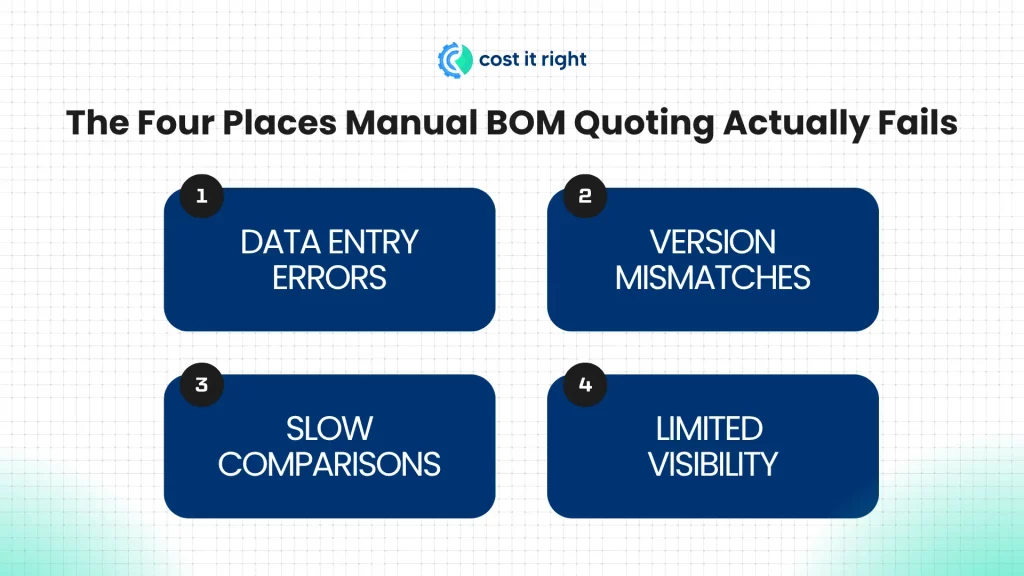
Data entry errors that surface too late to matter. A transposed digit on a part number, a revision letter copied from the wrong column, doesn’t get caught at the point of entry. It gets caught when the wrong material arrives at the dock, weeks into a lead time that now has to restart from the beginning.
Version mismatches that go undetected until someone compares quotes side by side. A BOM with hundreds of line items can go through ten or more revisions during a single sourcing cycle. If different suppliers quote against different versions because the RFQ packages went out on different days, the resulting quotes aren’t actually comparable, and nothing in a spreadsheet flags that they shouldn’t be.
Comparisons that take longer than the actual decision. One supplier quotes per piece, another per kilogram, a third sends a PDF with pricing embedded in a table format a spreadsheet can’t parse cleanly. Getting all of that into one comparable view is often the single largest time sink in the entire process, well ahead of the time spent actually deciding which supplier to select.
Visibility that stops at whoever’s running the spreadsheet. The costing engineer managing the sourcing event knows where things stand. The production planner waiting on a delivery date, the finance controller tracking committed spend, and the engineer who might need to approve a substitution generally don’t, because the only record of status lives in one person’s working file.
Getting a Clean Comparison Isn’t the Same as Getting a Fair Price
Every one of the four failures above is a real, well-documented problem, and solving them, cleanly formatted RFQ packages, version control, standardized comparison, shared visibility, genuinely improves BOM-level sourcing. It’s also not the whole problem, and it’s worth being direct about what it doesn’t solve.
A perfectly clean, perfectly comparable set of quotes still only tells you which supplier is cheapest relative to the others in that specific RFQ. It doesn’t tell you whether the winning quote, on any given line, actually reflects a fair cost structure. If every supplier responding to a stamped bracket line item prices at a similar margin above the part’s true material, labor, and machine cost, a clean comparison will confidently select a winner, and that winner can still be meaningfully overpriced. Formatting and reconciliation problems are visible and get fixed because they’re annoying. Price-fairness problems are invisible in a comparison view built only to rank suppliers against each other, which is exactly why they tend to survive even after a BOM-quoting process gets fully cleaned up.
A Worked Example: Should-Cost Benchmarking Across a Multi-Line BOM
Take three line items from a larger BOM: a stamped bracket, a machined shaft, and a fastener pack, each sourced from a different supplier who came back with the lowest quote in their respective RFQ package:
| Line Item | Winning Quote | Should-Cost Benchmark | Gap |
| Stamped bracket | $7.95 | $6.80 | +17% |
| Machined shaft | $22.40 | $22.10 | +1% |
| Fastener pack | $3.10 | $2.35 | +32% |
A comparison view alone reports three clean wins: lowest quote selected on every line, RFQ complete. Running each winning quote against an independent should-cost benchmark, built from material, labor, and machine hour rate data rather than from the quotes themselves, tells a different story. The machined shaft is priced close to should-cost, nothing to challenge there. The stamped bracket is 17% over, and the fastener pack, the line item least likely to get a second look precisely because it’s the smallest dollar amount on the BOM, is 32% over. Across a 300-line BOM, gaps like the fastener pack’s are exactly the ones a purely comparison-based process never surfaces, because nothing about “cheapest of three quotes” flags a line where every quote in the set happens to be inflated by a similar margin.
What to Look for in BOM-Level Quoting Software
- Does it handle the full BOM as one sourcing event, splitting and routing line items to the right suppliers automatically, or does it still require manually dividing the BOM into packages?
- Does it cross-check part revisions between the BOM and supplier responses, or does version mismatch detection depend on someone noticing?
- Does supplier response data come back in a standardized, directly comparable format, or does every response still need manual reformatting before it can be evaluated?
- Does it benchmark winning quotes against an independent should-cost model, line by line, or does it stop at ranking suppliers against each other?
- Is sourcing status visible to people outside the procurement team, production planning, finance, engineering, or does it live in one person’s working file?
How Cost It Right Handles BOM-Level Quoting End to End
Cost It Right’s RFQ portal handles BOM-type RFQs as a defined request type, with part information, quantities, and technical requirements pulled from the BOM directly rather than manually re-entered per supplier package, addressing the data-entry and version-mismatch failures from Section 3 at the source. Supplier responses come back through the same standardized portal format covered in Cost It Right’s broader RFQ workflow, so the unit and format mismatches that eat time in manual comparisons don’t arise in the first place.
The part that closes the gap from Section 4 is should-cost benchmarking applied at the same BOM scale as the comparison itself. Every winning quote on every line, not just the ones that look unusual, gets checked against an independent should-cost model built from material, labor, and machine hour rate data. The Cost Variance report extends this further, comparing the same part’s cost structure across vendors, plants, or time, so a line like the fastener pack in Section 5, small enough to get overlooked in a manual review, still gets the same scrutiny as the highest-dollar line on the BOM. That’s the practical difference between a BOM-quoting process that produces a clean comparison and one that produces a comparison you can actually trust line by line.
FAQs
BOM-level quoting is the process of sourcing an entire bill of materials, potentially hundreds of line items split across multiple suppliers, as one coordinated sourcing event with comparable quotes across every line, rather than sourcing individual parts one at a time.
The reconciliation work, formatting RFQ packages, checking revisions, and comparing supplier responses in different formats, scales with the number of line items multiplied by the number of supplier responses, not with a fixed weekly capacity. A process that works comfortably on a 50-line BOM can require dramatically more hours on a 300 or 400-line one, often past the point where it fits in the time actually available.
No. Automation that cleans up formatting, version control, and comparison solves real problems, but it only ranks supplier quotes against each other. It doesn’t confirm that the winning quote on any given line reflects a fair cost structure, which requires benchmarking against an independent should-cost model, a separate capability many BOM-quoting tools don’t include.
Cost estimates vary by process and part complexity, but APQC’s benchmarking research puts the cost of processing a single purchase order at roughly $14 to over $54, a difference the organization attributes to how the process is structured. Across a BOM with hundreds of lines sourced multiple times a year, that range compounds into a substantial, if often untracked, operating cost.
BOM-level quoting is about efficiently collecting and comparing supplier quotes across an entire bill of materials. Should-cost analysis is about independently verifying whether any given quote, including the winning one, actually reflects a fair cost. The two are complementary: BOM-level quoting without should-cost benchmarking can still produce a clean process that quietly overpays on individual lines.