Table of Contents
What Is Should-Cost Analysis Software?
How Should-Cost Analysis Actually Works
Should-Cost Analysis vs. Cost Estimating Software: The Real Difference
The 10 Must-Have Features in Should-Cost Software
How Manufacturers Use Should-Cost Analysis
Why Excel and Manual Costing Break Down at Scale
Should-Cost Analysis by Process: Sheet Metal, Machining, Casting, Injection Molding
Should-Cost Software Buyer’s Checklist
How Cost It Right Helps
Final Thoughts
FAQs
What Is Should Cost Analysis Software?
Should cost analysis software is a category of manufacturing cost intelligence platforms that build an independent, bottom-up model of what a part, assembly, or finished product should cost to manufacture- based on material, labor, machine, tooling, overhead, and process data- rather than relying on what a supplier quotes.
The discipline of should-cost analysis originated in defense procurement, where buyers needed a defensible, engineering-based cost benchmark independent of a contractor’s price. It has since become standard practice across automotive, industrial, electronics, and consumer manufacturing, anywhere a buyer needs to know the difference between price and cost before negotiating.
Should-cost software typically helps manufacturing and procurement teams:
- Build bottom-up cost models by material, process, labor, and overhead
- Compare supplier RFQ responses against an independent cost benchmark
- Detect pricing gaps, margin padding, and cost leakage in supplier quotes
- Run what-if simulations across volume, material substitution, and process changes
- Track commodity and raw material index movements and their downstream cost impact
- Maintain historical RFQ and supplier data for benchmarking future sourcing decisions
- Route cost and price changes through structured, auditable approval workflows
The core value isn’t just “estimating cost” – it’s giving procurement and engineering teams a fact-based negotiation position instead of a price-taking one.
How Should-Cost Analysis Actually Works
Not all should-cost software calculates cost the same way. Understanding the underlying methodology matters when evaluating a platform, because it directly affects accuracy, speed, and which processes it can realistically cover.
Bottom-up (should-cost) modeling builds cost from first principles: raw material quantity and price, machine hour rate (MHR) per process, labor time and rate, tooling amortization, yield/scrap, and overhead allocation. This is the most accurate approach and the one most manufacturing procurement teams mean when they say “should-cost analysis.” It requires accurate machine and labor rate data but produces a defensible, component-level cost breakdown that can be discussed line-by-line with a supplier.
Parametric modeling estimates cost using statistical relationships between a product’s characteristics (weight, size, material, complexity) and historical cost data, without a full bottom-up build. It’s faster for early-stage estimates but less precise for supplier-level negotiation, and depends heavily on how much historical data the platform has been trained on.
Analogical (comparative) modeling estimates cost by comparing a new part to similar parts that have already been costed, adjusting for differences. It’s useful for quick, directional estimates early in product design, but isn’t precise enough on its own for final sourcing decisions.
Most manufacturers evaluating should-cost software for active procurement and negotiation- rather than early concept costing- should prioritize platforms with strong bottom-up, MHR-driven costing, since that’s what produces numbers a supplier can’t easily dispute.
Should-Cost Analysis vs. Cost Estimating Software: The Real Difference
These terms are often used interchangeably, but they’re not identical:
| Should-Cost Analysis | Cost Estimating | |
| Purpose | Model the expected/ideal cost independent of a quote | Estimate cost for quoting, budgeting, or planning |
| Primary user | Procurement, sourcing, costing engineers | Sales, quoting, production planning |
| Typical output | Cost breakdown used to negotiate against a supplier’s price | A price or cost figure used to quote a customer or plan production |
| Data depth | Deep- material, MHR, labor, tooling, overhead, commodity indices | Varies- can be simple or equally deep |
In practice, a strong should-cost platform includes cost estimating capability, but a cost estimating tool doesn’t always include the negotiation-ready, bottom-up rigor that should-cost analysis requires.
Should-Cost Software Comparison: Cost It Right vs. Other Platforms
| Software Platform | Best For | Core Competitive Edge | Target Verticals |
| Cost It Right | Mid-market to enterprise OEM costing & procurement, global sourcing | Bottom-up MHR-driven costing built from real-world implementations across manufacturers worldwide, with RFQ management, vendor negotiation, commodity indexing, and approval workflows built into one connected platform | Automotive, auto components, sheet metal, heavy industrial manufacturing, electronics, and appliance manufacturers, sourcing globally |
| aPriori | 3D CAD cost automation | Generates cost models directly from CAD geometry and digital twin simulation | Automotive, aerospace, industrial machinery |
| GEP Quantum Intelligence | Enterprise procurement suites | Connects should-cost models directly into active RFx, POs, and contract management | Global multi-category enterprise sourcing |
| SEER by Galorath | Parametric & risk-based costing | Parametric cost modeling with formal traceability, originally built for defense estimating | Defense, aerospace, government contracting |
| DFMA (Boothroyd Dewhurst) | Design-to-cost, DFM/DFA | Product simplification and manufacturing-sequence optimization at the design stage | Product development and R&D engineering |
Why real-world calibration matters: Cost models are only as credible as the data they’re built on. Cost It Right’s should-cost engine has been built and refined from real, plant-level implementations with manufacturers across geographies — not adapted from a single home-market average and extended outward. That means the platform reflects actual labor rates, machine rates, and supplier realities wherever a manufacturer sources, rather than assuming one region’s cost structure fits all.
Why deployment flexibility matters: Enterprise should-cost platforms are often priced and deployed as multi-quarter, seven-figure implementations, which puts them out of reach for many manufacturers with strong costing discipline but leaner IT budgets. Cost It Right delivers the same bottom-up, MHR-driven rigor to both enterprise manufacturers and mid-market OEMs, without forcing every customer into an enterprise-scale rollout.
The 10 Must-Have Features in Should-Cost Software
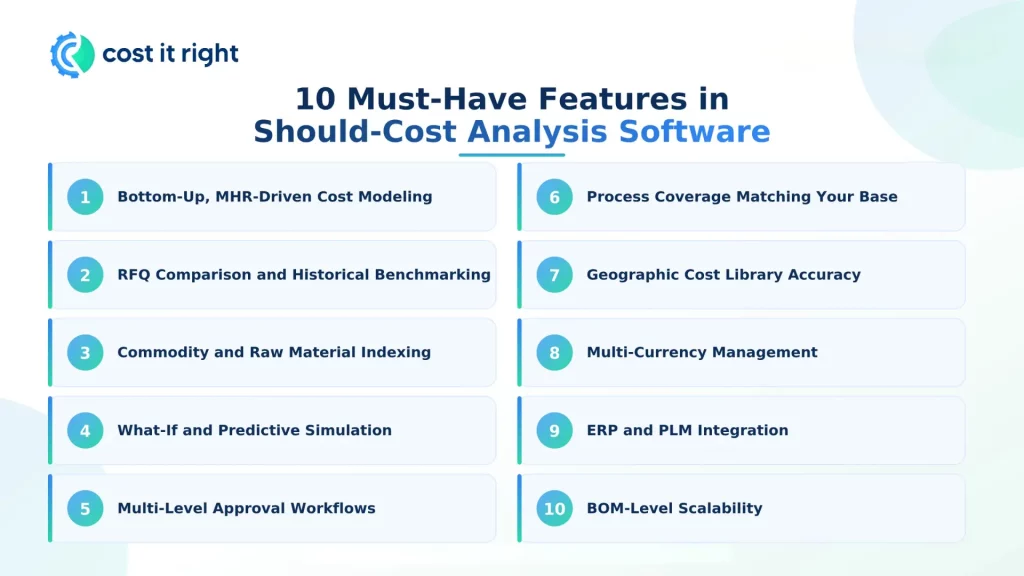
- Bottom-Up, MHR-Driven Cost Modeling: The platform should calculate cost from machine hour rate, labor rate, material, tooling, and overhead- not a black-box estimate. Critically, when a machine rate, labor rate, or material price changes, that change should cascade automatically into every dependent product cost, instead of requiring a manual rebuild of every affected cost sheet.
- RFQ Comparison and Historical Benchmarking: The ability to compare multiple supplier RFQ responses side-by-side against your should-cost model, flag outliers instantly, and retain historical RFQ data so every new quote is benchmarked against what you’ve paid and what the model said you should pay- in the past.
- Commodity and Raw Material Indexing: Automated tracking of steel, aluminum, plastic resin, and other commodity indices, with automatic flagging of how price movements affect existing product costs and active supplier contracts.
- What-If and Predictive Simulation: The ability to simulate cost impact before committing- changing volume, material grade, supplier, or process route and instantly seeing the effect on landed cost.
- Multi-Level, Auditable Approval Workflows: Price and cost changes should route through configurable approval chains with a full audit trail- not email threads, chat messages, or informal sign-off.
- Process Coverage Matching Your Manufacturing Base: The platform should model the specific processes you actually buy- sheet metal fabrication, CNC machining, casting, forging, injection molding, or electronics assembly- since each has a fundamentally different cost structure.
- Geographic Cost Library Accuracy: Labor rates, machine rates, and material prices should be calibrated to where you actually source- not a single global default that skews estimates for regional supply chains.
- Multi-Currency Management: For manufacturers sourcing across borders, the platform should handle multi-currency costing natively, so currency fluctuation is reflected in landed cost rather than tracked separately.
- ERP and PLM Integration: The platform should connect to your existing ERP, PLM, or procurement systems via API, so cost and part data flow automatically instead of requiring manual re-entry.
- BOM-Level Scalability: The software should be able to run should-cost analysis across a full multi-hundred-line bill of materials at once, not one component at a time- critical for any assembly-level sourcing decision.
How Manufacturers Use Should-Cost Analysis
- Supplier negotiation: Walking into a supplier discussion with a line-item cost breakdown, rather than just accepting or rejecting a quoted price.
- RFQ validation: Checking incoming RFQ responses against an independent model before they reach an approval workflow, so obviously inflated quotes are flagged early.
- New supplier evaluation: Benchmarking a new supplier’s pricing against what your should-cost model- and your historical supplier data- says the part should cost.
- Raw material impact analysis: Understanding how a steel or aluminum price movement changes the cost of dozens of components simultaneously, instead of recalculating each one manually.
- Make-vs-buy and sourcing strategy: Comparing the should-cost of producing a component in-house versus sourcing it, or sourcing it from one region versus another.
- Cost reduction programs: Identifying which components have the largest gap between quoted price and should-cost, so cost-reduction efforts target the highest-impact parts first.
Why Excel and Manual Costing Break Down at Scale
Spreadsheets work for a single, one-off estimate. They break down as costing complexity grows, for a set of very specific reasons:
- No cascading updates. Changing one machine rate or material price means manually finding and updating every cost sheet that depends on it- and it’s easy to miss one.
- No audit trail. Approvals, overrides, and changes happen outside the file itself, with no structured, timestamped history of who changed what and why.
- No RFQ comparison at scale. Comparing dozens of supplier quotes across multiple concurrent RFQs in separate spreadsheets becomes unmanageable and error-prone.
- No live commodity data. A spreadsheet doesn’t automatically reflect current material index movements or currency shifts- someone has to remember to update it.
- No historical benchmarking. Past supplier and RFQ data isn’t systematically retained or searchable across the organization; it lives in whoever built the original file.
- Version control risk. Multiple people editing multiple copies of the same cost sheet is one of the most common sources of costing errors in manufacturing procurement.
None of this means spreadsheets are a bad tool- they’re simply not built for cascading, auditable, multi-supplier, multi-commodity costing at organizational scale, which is exactly the gap centralized should-cost platforms are built to close.
Should-Cost Analysis by Process
Cost structure varies significantly by manufacturing process, so a should-cost platform’s accuracy depends on how well it models the specific process in question:
- Sheet metal fabrication: Cost is driven heavily by material utilization and nesting efficiency, not just raw material price- two suppliers quoting the same steel grade can have very different true costs depending on how efficiently they nest parts on the sheet.
- CNC machining: Machine hour rate, cycle time, tool wear, and setup time dominate cost, making accurate MHR calculation essential.
- Casting and forging: Tooling amortization, yield rate, and secondary machining operations are major cost drivers beyond raw material.
- Injection molding: Tooling cost amortization, cycle time, and resin price volatility drive cost, with mold complexity significantly affecting both.
A should-cost platform that only models one process well- commonly sheet metal or CNC- will underperform for manufacturers sourcing across a mixed process base.
Should-Cost Software Buyer’s Checklist
Before selecting a platform, manufacturers should get clear answers to:
- Does it use true bottom-up, MHR-driven costing, or parametric estimates only?
- Are labor, machine, and material rates calibrated to the regions you actually source from?
- Can it run should-cost across a full BOM, not just one part at a time?
- Does a rate change cascade automatically, or does it require manual rework?
- Does it integrate with your ERP/PLM, or operate as an isolated tool?
- Does it include RFQ comparison and historical supplier benchmarking, or only cost modeling?
- What’s the actual implementation timeline and cost- weeks, or quarters?
How Cost It Right Helps
Cost It Right centralizes bottom-up, MHR-driven should costing, RFQ analysis, vendor negotiation, commodity indexing, and multi-level approval workflows in a single connected platform- built from real-world implementations with manufacturers across geographies, from India to global OEM supply chains.
Instead of managing costing through disconnected spreadsheets, teams get product-level cost visibility, cascading cost updates when machine or material rates change, full BOM-level scalability, and a structured RFQ and negotiation process that plugs directly into procurement decisions- without the implementation scale of enterprise-only platforms.
Final Thoughts
Should-cost analysis software has moved from a defense-procurement specialty to a standard requirement for manufacturing procurement teams that want fact-based supplier negotiations. Platforms like aPriori, GEP, and SEER each serve specific enterprise use cases well, but manufacturers- whether mid-market or enterprise, sourcing regionally or globally- need cost models built on real labor rates, machine costs, and supplier realities, not generic averages. Combining should costing with MHR-based cost modeling, RFQ management, and structured procurement workflows gives manufacturers far more control over profitability than spreadsheets ever can.
FAQs
Should-cost analysis software helps manufacturers build an independent, bottom-up model of what a part or product should cost to produce- based on material, labor, machine, and overhead data- so procurement teams can negotiate from a defensible cost benchmark instead of just reacting to a supplier’s quoted price.
Manufacturers use should costing to improve supplier negotiations, validate and compare RFQs, reduce procurement cost leakage, understand the true cost impact of raw material price changes, and make better sourcing decisions across new and existing suppliers.
Look for bottom-up MHR-driven cost modeling with cascading updates, RFQ comparison and historical benchmarking, commodity/raw material indexing, what-if simulation, multi-level approval workflows, geographic cost library accuracy, multi-currency support, ERP/PLM integration, and BOM-level scalability.
They overlap, but should-cost analysis specifically models the ideal or expected cost independent of a supplier’s quote- most often used to prepare for negotiation- while cost estimating software may be used more broadly for quoting, job costing, and production planning.
Bottom-up modeling builds cost from actual material quantities, machine hour rates, labor time, and overhead- the most precise and defensible approach for supplier negotiation. Parametric modeling estimates cost from statistical relationships to historical data, which is faster for early design-stage estimates but less precise for final sourcing decisions.
Excel can work for basic, single-part estimates, but breaks down when managing supplier comparisons at scale, cascading rate changes, structured approvals, multi-commodity tracking, and historical procurement benchmarking- which is why manufacturers with active, ongoing sourcing programs move to centralized platforms.
Cost It Right is built and proven with automotive, auto-component, heavy industrial, electronics, and appliance manufacturers worldwide, with its cost models shaped by real, plant-level implementations rather than a single-region average. It delivers bottom-up should-cost, RFQ, and negotiation workflows to both enterprise and mid-market manufacturers, without forcing every customer into the multi-quarter, enterprise-only implementation model typical of some competing platforms.
Should-cost analysis applies to any manufacturing process with a definable cost structure, most commonly sheet metal fabrication, CNC machining, casting, forging, injection molding, and electronics assembly- though accuracy depends on how well a given platform models the specific process.